Cutout Pro

Cutout Pro

Edit, enhance, and transform images and videos in one place.

No reviews yet

Be the first
Overview

What is Cutout Pro?

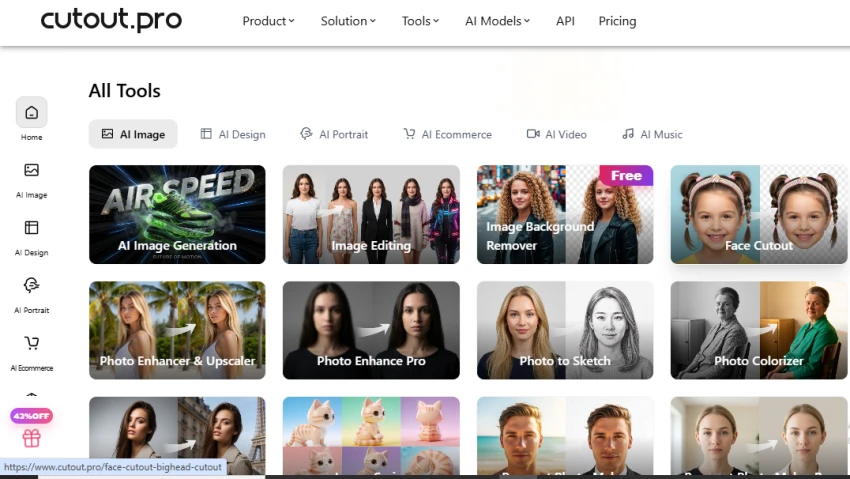
Cutout.Pro is a visual content editing platform that provides tools for removing image and video backgrounds, enhancing photos, generating images and videos, removing unwanted objects, creating ID photos, and animating portraits. It also includes tools for e-commerce images, photo retouching, AI design, and developer API integration.
Deep dive

More about Cutout Pro

Do's

  • Remove backgrounds from product and portrait photos.
  • Upscale low-quality images for clearer results.
  • Use object removal to clean unwanted elements from photos.
  • Create passport and ID photos with suitable backgrounds.
  • Try image-to-video tools to turn static images into videos.

Don'ts

  • Expect every complex image to have perfectly clean edges.
  • Upload sensitive photos without reviewing the platform's privacy terms.
  • Assume all high-resolution downloads are free, as credits may be required.

How to Get Started with Cutout.Pro

  1. Visit Cutout.Pro and choose the image or video editing tool you want to use.
  2. Upload your image by dragging it into the workspace or selecting it from your device. 
  3. Let the tool automatically process the uploaded file.
  4. Use the available editing options to refine the result, change the background, or make additional adjustments. 
  5. Preview the final result and download the edited image in your preferred format.

Testing Steps: Cutout.Pro

  1. Opened the All Tools section to explore Cutout.Pro’s available image and design utilities.
  2. Explored the AI Image category and reviewed tools such as Image Generation, Image Editing, Background Remover, and Photo Enhancer.

    3. Checked the AI Portrait section to explore options including AI Headshot Generator, Cartoon Selfie, Anime Enhancer, and Virtual Try-On.

    4. Compared the available portrait tools to identify different ways of transforming and enhancing personal photos.

Pricing 

PlanCreditsPrice
Free Account5 free creditsFree
Subscription80 credits/month₹246.50
Subscription170 credits/month₹586.50
Subscription300 credits/month₹1,096.50
Subscription550 credits/month₹2,116.50
Subscription1,000 credits/month₹4,165.00
Subscription1,450 credits/month₹5,865.00
Pay as you go30 credits₹254.15
Pay as you go300 credits₹2,465.00
Pay as you go900 credits₹6,715.00
Pay as you go3,000 credits₹16,915.00
Pay as you go30,000 credits₹118,915.00
Pay as you goCustomContact Us
The verdict

Pros & cons

Pros

Removes backgrounds while preserving fine details such as hair and edges.

Includes separate tools for both image and video background removal.

Can upscale low-resolution images for sharper output.

Offers object removal for cleaning unwanted elements from photos.

Cons

Detailed edits may require manual refinement after automatic processing.

Higher-resolution downloads can consume credits.

Results can vary when subjects have complicated edges or backgrounds.

★ Verified reviews

Cutout Pro reviews

No reviews yet — be the first to share your experience.

No reviews yet

Be the first to share an honest, verified review of Cutout Pro.

~ Compare

Cutout Pro alternatives

Other tools in the same category worth a look.

See full category