No reviews yet
Be the firstOpen Krea and access the image-generation workspace.
Prompt: Create a cinematic scene of a small wooden cabin surrounded by a snowy forest at sunset, warm lights glowing through the windows, realistic photography style.
Enter the prompt, select an available image model, and generate the image.
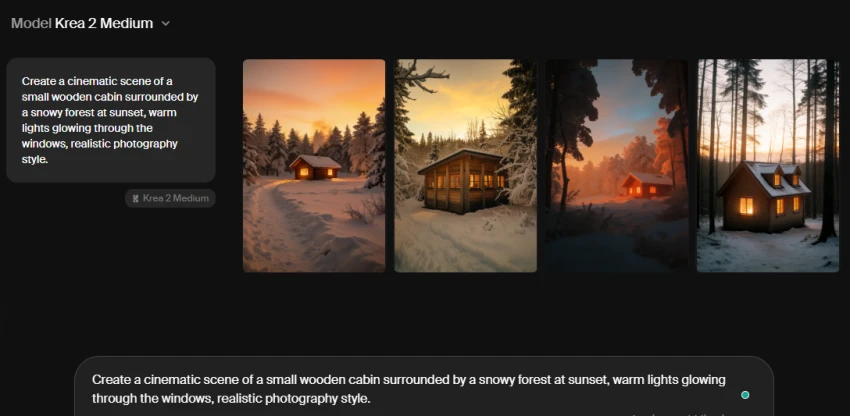
Review the generated image and check the available options for editing, regenerating, or refining the result.
Use the image editor to make changes to the generated visual, such as modifying details or adding a new visual element.
Use Krea's enhancement or upscaling tool to improve the image quality and resolution.
| Plan | Monthly Price | Compute Units |
|---|---|---|
| Free | $0/month | 100 units/day |
| Basic | $9/month | 5,000 units/month |
| Pro | $35/month | 20,000 units/month |
| Max | $105/month | 60,000 units/month |
| Business | $200/month | 80,000 units/month |
| Enterprise | Custom | Custom |
Supports image, video, 3D, and editing workflows in one platform.
Provides access to many different generation models.
Real-time generation is useful for quick experimentation.
Includes image enhancement and upscaling tools.
Advanced models consume compute units.
Video generation can use credits quickly.
Some models and features are restricted by plan.
No reviews yet — be the first to share your experience.
Be the first to share an honest, verified review of Krea AI.
Other tools in the same category worth a look.

Welcome 6 frosting.ai
Be the first to review
Free AI Image Creator Online, create unlimited AI images online in 2 s...
Be the first to review
Yours To Create
Be the first to review
Remaker AI - The Easiest Way to Recreate Any Image
Be the first to review
Create content that reflects your ideas.
Be the first to review
Stylar is your virtual dressing room
Be the first to review
Discover and Create AI Art
Be the first to review
Discover and Create AI Art
Be the first to review