Teachable Machine

Teachable Machine

Train your own AI model with images, sounds, and poses no coding required.

No reviews yet

Be the first
Overview

What is Teachable Machine?

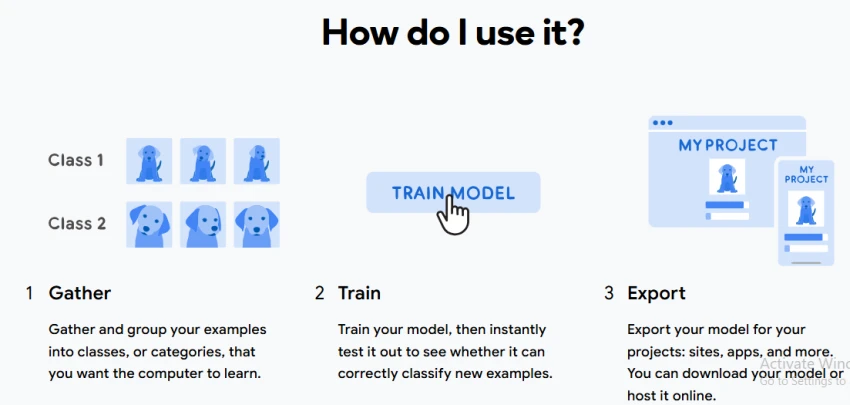
Teachable Machine is a browser-based experiment by Google Creative Lab that lets users train simple machine learning models directly from a camera or microphone with no coding required. It focuses on teaching how supervised learning works by allowing people to create image, sound, or pose classifiers in a visual interface and see the training process live in the browser. Models are trained locally and can then be exported for use in sites, apps, and other projects, making it a quick way to turn captured examples into working recognition models. The emphasis is on accessibility, fast setup, and hands‑on exploration of machine learning concepts through direct interaction rather than configuration-heavy workflows.
Capabilities

Teachable Machine features

Teach a machine using your camera, live in the browser, with no coding required.
Create projects that recognize images, sounds, or poses using a simple training interface.
Train a neural network locally on the device without sending images to a server in the default experiment.
Instantly test trained models to see whether they correctly classify new examples.
Export trained models for use in websites, apps, and other projects.
Deep dive

More about Teachable Machine

Features

  • Image Classification – Train a model to recognize different image categories.
  • Sound Classification – Train models to recognize short audio samples.
  • Pose Classification – Teach the model to distinguish different body positions.
  • Webcam Capture – Collect image or pose examples directly from a webcam.
  • Microphone Input – Record sounds for audio classification.
  • File Uploads – Use existing examples as training data.

Use Cases

  • Teaching students basic machine-learning concepts.
  • Creating simple image-recognition systems.
  • Building gesture-controlled projects.
  • Creating voice or sound-controlled applications.
  • Developing interactive games.
  • Building webcam-based experiments.
  • Creating object-classification prototypes.

Dos and Don'ts

Do

  • Give each class clear and meaningful examples.
  • Include different angles, backgrounds, and variations where appropriate.
  • Use enough examples for each class.
  • Test the model with examples it did not see during training.
  • Add more examples when the model repeatedly makes mistakes.
  • Keep training classes reasonably balanced.
  • Review how the model performs before using it in a real application.
  • Use the tool as a practical way to teach AI and machine-learning concepts.

Don't

  • Assume the model understands objects or concepts like a human.
  • Train it using only a few nearly identical examples.
  • Use heavily biased training examples and expect reliable results in different conditions.
  • Treat a high confidence score as proof that the classification is correct.
  • Use a simple prototype as a production-ready machine-learning system
The verdict

Pros & cons

Pros

Completely free to use.

No coding experience is required to train a model.

Supports image, audio, and pose classification.

Training happens directly in the browser.

Users can capture examples with a webcam or microphone.

Cons

It is primarily designed for classification rather than generating new images, text, or videos.

Model quality depends heavily on the examples provided during training.

Simple or unbalanced training examples can produce unreliable classifications.

It does not provide the advanced model-training controls found in professional machine-learning platforms.

★ Verified reviews

Teachable Machine reviews

No reviews yet — be the first to share your experience.

No reviews yet

Be the first to share an honest, verified review of Teachable Machine.

~ Compare

Teachable Machine alternatives

Other tools in the same category worth a look.

See full category