The AI-ready integration and automation platform.

No reviews yet

Be the first
Overview

What is Tray?

Tray, now presented as Tray.ai, focuses on orchestrating data, applications, and AI on a single integration and automation platform. It enables the building of AI agents, central management of MCP servers, and connections to hundreds of cloud services through a low-code environment for process automation, data integration, and API management. The product emphasizes unified observability, audit trails, and controlled data access, including PII tokenization and role-based access, to support governed automations and AI workflows. Its positioning centers on combining intelligent integration capabilities with automation and AI agent deployment so that complex, multi-system workflows, data movement, and approvals can run in a single, AI-ready orchestration layer.
Capabilities

Tray features

AI-ready integration and automation platform for building and orchestrating AI agents alongside traditional workflows
Low-code visual workflow builder for multi-step automation with branching logic, loops, and custom code steps
Process automation and data integration across hundreds of pre-built connectors and any REST or GraphQL API
API management and embedded integrations for exposing and governing services across systems
Unified observability, audit trails, PII tokenization, and access controls for governed automations and AI agents
Deep dive

More about Tray

How to Get Started?

  1. Visit Tray AI.
  2. Request a demo or contact the Tray.ai team.
  3. Identify the applications and systems you want to connect.
  4. Select the appropriate connectors from Tray's connector library.
  5. Create a workflow using triggers, actions and data-processing steps.
  6. Add AI capabilities or an AI agent where reasoning or automated decisions are needed.
  7. Configure authentication and permissions.
  8. Test the workflow with sample data.
  9. Add monitoring, error handling and governance controls.
  10. Deploy the workflow and monitor task/AI usage in production. Tray's official quickstart describes the basic workflow pattern as getting data from one service, processing it, and sending it to another.

Use Cases

  • Sales Operations: lead routing, CRM synchronization and sales workflows.
  • Marketing: campaign automation, lead enrichment and marketing-data synchronization.
  • Customer Support: support-ticket triage and customer-data workflows.
  • Finance: invoice processing, approvals, reconciliation and order-to-cash workflows.
  • IT Operations: service management, access requests and system integrations.
  • Data Integration: synchronize information between SaaS applications and databases.
  • AI Agents: build agents that retrieve information and take actions across business systems.
  • MCP/AI Connectivity: make business tools available to AI assistants through governed MCP connections.
The verdict

Pros & cons

Pros

Large library of 700+ connectors.

Combines integrations, automation and AI agents on one platform.

Strong enterprise governance and security capabilities.

Supports both visual low-code development and AI-assisted development.

MCP/Agent Gateway enables controlled connections between AI agents and business systems.

Suitable for complex multi-system workflows.

Supports monitoring and auditability.

Can integrate AI into existing business processes rather than requiring separate automation tools.

Cons

Primarily designed for businesses and enterprise teams rather than casual individual users.

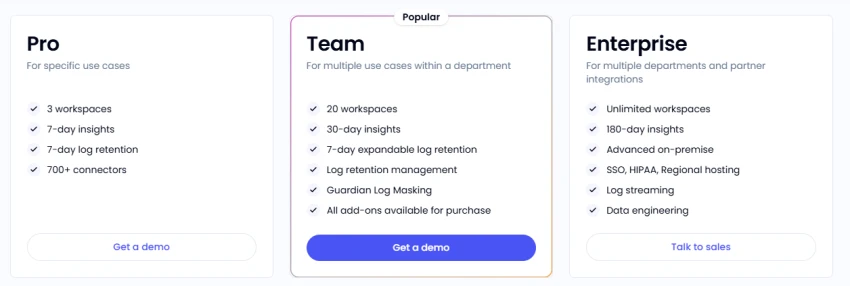
Pricing is not transparently listed as simple public tiers.

Advanced AI features may require specific plan access or sales enablement.

Credit/task-based usage requires monitoring at higher volumes.

Complex integrations can require technical knowledge and workflow design.

The breadth of connectors and capabilities can create a learning curve for new users.

★ Verified reviews

Tray reviews

No reviews yet — be the first to share your experience.

No reviews yet

Be the first to share an honest, verified review of Tray.

~ Compare

Tray alternatives

Other tools in the same category worth a look.

See full category