A chatbot answers your question and stops. An agent takes a goal and works through it: it browses sites, runs code, opens and edits files, uses your connected apps, and checks its own progress until the job is done or it gets stuck and needs you.
“Agent” doesn’t mean “set it and forget it,” though. These tools usually need permissions you grant, accounts you connect, and credits you spend. And they should always pause before doing anything that really matters, like making a payment, sending an email, or publishing a page. Good agents build in those checkpoints. Weaker ones quietly burn your budget retrying a step that broke.
We picked tools that plan and do the work, not ones that only talk about it. For each, we looked at what it can finish (a report, a spreadsheet, a live website, an updated CRM record), how well it handles the web and your apps, how much supervision it needs, and what it really costs once you factor in credits and usage caps. The seven below each win a different kind of job.
Prices are in US dollars, checked against vendor pages and recent reports as of 29 October 2026. “Starting price” is the cheapest paid plan that actually unlocks the agent features, which isn’t always the cheapest plan overall. We’ve flagged the credit-based tools, because a single monthly number can hide the real cost.
| AI Agent | Best for | Multi-step work | Free option | Starting price (agent) | Main limitation |
|---|---|---|---|---|---|
| ChatGPT (Agent / Work mode) | General work and deliverables | Browses, uses a virtual computer, builds files, schedules tasks, connects apps | Yes (no agent mode) | $20/mo (Plus) | Runs take 5 to 30 min, task caps; no EEA or Switzerland |
| Claude | Coding and file-heavy work | Reads and edits local files, connectors, skills, Claude Code for software | Yes (no agent or Code) | $20/mo (Pro) | Agent and chat share one usage pool |
| Gemini | Google and Microsoft users | Works across Workspace and M365, Chrome Auto Browse, sub-agents | Yes (no agent) | $19.99/mo (Google AI Pro) | Consumer and business agents differ; business price not public |
| Manus | Hands-off research | Cloud computer with browser, terminal, files; parallel “Wide Research” | Yes (300 daily credits) | ~$20/mo (4,000 credits) | Credits run out fast; check the output |
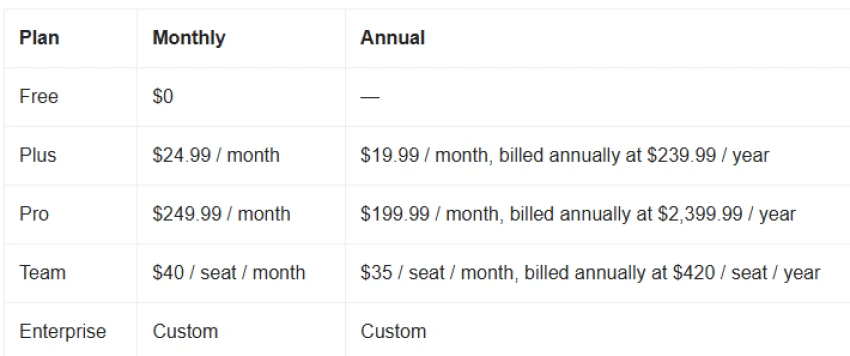
| Genspark (Super Agent) | Slides, sites, and phone calls | Builds decks, websites, sheets, videos; makes real calls | Yes (100 to 200 daily credits) | $24.99/mo ($19.99 annual) | Credits burn even on failed tasks; weak support |
| Perplexity Comet | Web research and browser tasks | AI browser that reads and acts on pages; Deep Research | Yes (free browser) | $20/mo (Pro) for more | Can be tricked by bad web pages; keep it off sensitive accounts |
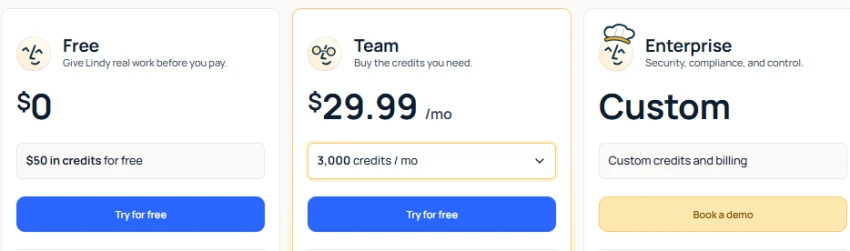
| Lindy | Business automation | No-code agent builder; triggers; 5,000+ app connections; voice | Trial only (7 days) | $49.99/mo (Plus) | Credit cost is hard to predict; voice billed separately |
Best for: A reliable all-rounder that researches, browses, and hands back a finished file.
What it does: OpenAI’s agent shows up as Agent mode and, since mid-2026, a separate “Work” mode that launched on 9 July 2026. Work sits next to the regular Chat mode and the coding-focused Codex mode, and it’s built for longer jobs that end in a real deliverable: a spreadsheet, a slide deck, a report, or a small web app. It runs on its own virtual computer, so it browses the web, fills in forms, runs code, and puts the pieces together. It also connects to tools like Slack, Gmail, Google Drive, and Salesforce, and it can run tasks on a schedule.
Key features:
OpenAI reports a 78.7% score on the OSWorld computer-use benchmark. That’s the company’s own figure, not something we tested.
A task it can run: You ask it to compare five suppliers. It opens its browser, visits each site, pulls pricing and lead times, drops everything into a spreadsheet, and gives you the file to download while you do something else.
What it finishes: Research reports, comparison spreadsheets, slide decks, small web apps, and web chores like gathering live data into a tidy format.
Where you still step in: Logins, CAPTCHAs, and anything you have to pay for. Runs are slow, often 5 to 30 minutes, and each plan has a cap on how many tasks you get. Agent mode is also unavailable in the EEA and Switzerland.
Pricing:

Pros:
Cons:
Verdict: If you want one agent that handles the widest range of general work and leaves you with a usable file, start here. Look elsewhere if coding is your main need or you’re in a region where agent mode isn’t offered.
Best for: Coding and file-heavy work, with output written straight to your own computer.
What it does: On top of chat, Claude works as an agent on your files. Its desktop agent (first launched as a separate “Cowork” product and now folded into the main Claude app) can open your local files and apps and carry a multi-step job through from start to finish, no coding needed. It keeps track of where it is across steps and saves finished files to a folder you choose. For software, Claude Code is its tool for working inside real codebases. The desktop agent arrived as a preview on 12 January 2026 and became generally available, with business controls, in April 2026.
Key features:
A task it can run: You point Claude Code at your repo and describe a bug. It reads the relevant files, finds the likely cause, makes the change, runs your tests, and keeps going until they pass, then tells you what it changed. Check the diff before you merge.
What it finishes: Documents and spreadsheets saved to your folders, tidied and renamed files, research write-ups, and code changes with tests run.
Where you still step in: Setup is on you, because Claude can’t touch a folder or app until you grant access. Heavy runs also share one budget with your regular chats, so a long agent session can eat into that.
Pricing:

Pros:
Cons:
Verdict: The best pick if coding matters to you, or if you want an agent that saves files locally with strict permissions. If you never touch code and want the simplest cloud setup, a lighter tool may fit better.
Best for: People and teams already working inside Google Workspace or Microsoft 365.
What it does: Google has two agents, and they’re easy to mix up. For individuals, Gemini’s agent mode and Spark run tasks across your Google apps. For companies, Google announced a single “Gemini agent” for work on 8 October 2026 that answers questions, does knowledge work, makes media, writes code, and can split a job into sub-agents. It reaches past Google too: Google says it works across Workspace, Microsoft 365, and Slack, with company rules and spending caps.
Key features:
A task it can run: You hand it a written proposal and ask for a branded deck. It drafts the slides inside Slides, ready for you to review and edit.
What it finishes: Decks, spreadsheets, email drafts, and summaries of long threads inside Workspace, plus checkpointed web tasks through Chrome. The business agent also coordinates sub-agents for longer work.
Where you still step in: The personal agent mostly stays inside your Google account, so a job that writes to an outside CRM needs a purpose-built agent. Chrome Auto Browse is US only and asks you to approve steps.
Pricing:

Pros:
Cons:
Verdict: The obvious choice for Google-first teams, and increasingly for M365 ones too. Outside that world, its edge fades.
Best for: Research you want to hand off and walk away from.
What it does: Manus runs on its own cloud computer. It plans the job, browses the web, writes code, and organizes files inside a sandbox, so you give it a goal and come back later. Its standout feature, Wide Research, splits a big request into parallel pieces, which works well for market maps, company lists, and product comparisons.
One note on ownership, since 2026 was messy: Meta bought Manus in December 2025, China’s regulator unwound the deal in April 2026, a Tencent-led group bought it back, and Manus has run on its own since 1 September 2026.
Key features:
A task it can run: You ask it to profile the top 20 vendors in a category with sources. Wide Research splits that into batches, each one browsing and pulling structured data, then stitches it into one comparison document with citations. Fact-check it before you rely on it.
What it finishes: Web research, data gathering, file and code work, charts, slides, and quick website prototypes. Expect to check and tidy the output.
Where you still step in: Mostly the budget. Every action spends credits, and complex tasks spend them fast, roughly 11 to 14 per minute depending on the job. Credits don’t roll over, and there’s no clean way to know how many reports a pool buys.
Pricing:

Pros:
Cons:
Verdict: Worth the $20 plan for autonomous research if you’re fine keeping an eye on the credit meter. If you want a predictable monthly bill, a flat-rate tool will annoy you less.
Best for: Turning one prompt into a finished creative piece, right down to a phone call.
What it does: Genspark’s Super Agent plans and runs multi-step jobs across a bundle of built-in tools. It makes presentations with fact-checking and exports to PPT or PDF, builds responsive websites with live links, places real phone calls for bookings and inquiries using AI voices, creates spreadsheets with charts, and generates videos and images.
Key features:
A task it can run: You describe a topic and the deck you want. Super Agent researches it, organizes the findings, builds a slide deck with images, and exports to PowerPoint or PDF for you to polish.
What it finishes: Decks, live websites, spreadsheets, short videos, audio briefings, and completed phone calls. That’s a wider range of finished media than most agents manage.
Where you still step in: Polish and budget. The designs often look AI-made and need a cleanup pass. Credits vanish fast on heavy formats like video, and you’re charged even for tasks that fail or get retried. Support has a poor reputation, with users reporting only automated replies and a low Trustpilot rating in 2026.
Pricing:
Pros:
Cons:
Verdict: A good fit when you need varied creative work quickly and don’t mind polishing it. If you want to automate the same task over and over at a predictable cost, Lindy is the better call.
Best for: Web research and browser tasks, with the lowest cost to get started.
What it does: Comet is Perplexity’s web browser (built on Chromium) with an AI assistant in every tab, backed by Perplexity’s agent, called Computer. It launched for Mac and Windows in July 2025, went free for everyone in October 2025, and reached Android and iOS by March 2026. The assistant reads and summarizes pages; the agent clicks, navigates, and fills forms for you.
Key features:
A task it can run: You open a handful of tabs, ask the assistant to pull the key points across them, then run Deep Research for a sourced write-up, all without leaving the browser.
What it finishes: Page summaries, cross-tab research, sourced Deep Research reports, and, with the agent, web actions like booking or filling in forms.
Where you still step in: Security is the main one. AI browsers can be tricked by a booby-trapped web page into doing something you didn’t ask for. The safe rule: don’t let Comet’s agent loose in a session that can reach your bank, health records, or work systems. Keep it to low-stakes tasks you’re watching.
Pricing:

Pros:
Cons:
Verdict: The best low-cost starting point for web research and light web automation, and one of the few agents you can try free with no subscription. Just keep the hands-off agent away from your bank and work accounts until you trust the task.
Best for: Automating business workflows across the apps you already use.
What it does: Lindy is a no-code tool for building AI agents (called “Lindies”) that run multi-step work across your connected apps. They triage email, schedule meetings, run outreach, and update records. Think of it as an automation platform with agents on top. You can describe a workflow in plain English and Lindy builds it: type “read incoming sales emails and draft a reply,” and it sets up an email trigger with a reply step already wired in.
Key features:
A task it can run: A new lead hits your CRM. The Lindy researches their background, drafts a personalized outreach email, and leaves it in your drafts for review. Nothing goes out until you approve it.
What it finishes: Full business workflows: inbox triage, scheduling, meeting notes and follow-ups, lead research, and CRM updates, plus phone calls through Gaia and small internal apps through Lindy Build.
Where you still step in: Building and budgeting. You configure it, so there’s real setup. And the credit cost is hard to predict, because credits are spent per step: a simple task costs 1 credit, a complex run costs 10 or more, and voice calls are billed on top. Credits don’t roll over. Choosing your model is also a Pro feature, so Plus users don’t get it.
Pricing:
Pros:
Cons:
Verdict: The one to pick when you want to automate a repeating business process reliably, not just run a one-off. Start on Plus with a single clear workflow. For general research or creative work, a cheaper general agent will do more for less.
There’s no single best AI agent, and anyone who tells you there is wants to sell you one. The right pick depends on the work you’re handing off, the apps involved, how reliable it needs to be, and the full cost once credits and caps are counted.
What actually matters is simple. Can it finish your real workflow? Can it show its sources so you can check? Does it handle a broken step without falling apart? And does it stop to ask before doing anything that counts? An agent that gets those right beats a flashier one that looks great in a demo and makes quiet mistakes.
So match the tool to the job: ChatGPT for general work, Claude for code, Gemini inside Google or Microsoft, Manus for hands-off research, Genspark for finished creative output, Perplexity Comet for free web research, and Lindy for business automation. Then do the thing most people skip: try it on a small, low-risk task first. See how it handles the messy middle before you trust it with anything important.
Related guides and breakdowns from the same category.





Join the conversation
No comments yet
Start the conversation on 7 Best AI Agents That Can Actually Finish Multi-St....