There are thousands of AI tools on the market right now, and new ones appear every week. According to McKinsey's latest State of AI survey, close to nine out of ten companies already use AI somewhere in their business. Plenty of them have also bought a tool, used it for a month or so, and then quietly let it go.
In most of those cases the tool itself was fine. The real issue was how it got chosen. Somebody saw a demo, liked it, signed up, and only later realised it did not fit the way the team actually works.
This guide gives you a simple six step process so that does not happen to you. It works whether you run a two person shop or a company with a few hundred staff.

Before you open a single product page, write down one clear problem you want AI to solve. Keep it specific. Here are three examples of the kind of thing we mean:
• Replying to customer emails takes our support team about three hours every day.
• Our sales team spends every Friday afternoon building the weekly report by hand.
• Nobody writes up meeting notes, so action items keep getting lost.
The best first problem is a task that repeats often, takes real time, and would not cause much damage if the AI got a small detail wrong. Customer emails are a good fit. Payroll is not.
Once you have your problem, note down two more things: how long the task takes today, and what a good result would look like. For the email example, a good result might be cutting the time from three hours a day to ninety minutes.
AI tools are not all the same, and this is where a lot of confusion comes from. Nearly every business tool on the market in 2026 fits into one of six groups. Work out which group your problem belongs to first. Comparing brands comes later.

• General AI assistants such as ChatGPT, Claude, Gemini and Microsoft Copilot handle writing, research, summaries and analysis. If your problem involves words or documents, start here.
• Automation tools and AI agents such as Zapier, n8n and Make move information between your apps and carry out multi step tasks. Good for anything that involves copying data from one place to another.
• Customer support AI, including chatbots and ticket assistants from companies like Tidio, Intercom and Zendesk, answers common questions around the clock and often in several languages.
• Marketing and design AI, such as Canva and Adobe Express, produces images, short videos, social posts, ad copy and presentations.
• Meeting and knowledge tools like Fireflies, Otter and Notion AI record calls, write up notes and action items, and make your company documents searchable.
• Data and analytics AI, found in tools like Power BI Copilot and ThoughtSpot, lets you ask questions about your numbers in plain English and get back charts and forecasts.
One thing that has changed a lot this year is the rise of AI agents. An agent does not just answer a question. It can carry out a whole job, such as reading an incoming email, updating the record in your CRM, and drafting a reply for you to approve. That is very useful, but because an agent takes action on its own, it needs clearer limits and closer checking than a simple chatbot. We come back to this in Step 3.
Once you know which type of tool you need, judge every option against the same seven points. Give each tool a score from 1 to 5 on each point. It sounds basic, but it stops the shiniest demo from winning by default.

Go back to the sentence you wrote in Step 1. Does this tool fix that exact bottleneck? Or does it simply have a long list of features that look impressive and that you will never open? A tool that does one thing well for you beats a tool that does fifty things you do not need.
If people find a tool confusing, they will stop using it within a few weeks, no matter how clever it is. We have seen companies buy a good tool, praise it in a meeting, and then watch it sit unused because nobody found it easy. Look for a clean layout, ready made templates, and a learning curve you can get through in an afternoon.
Check that the tool connects to your email, your CRM, your file storage, your chat app and your accounting software. A tool that sits on its own island creates more copying and pasting instead of removing it. Most vendors list their integrations on a page called something like "Integrations" or "Connectors", so this is a quick check.
This one matters more than any other point on the list. Before you sign up, ask the vendor these four questions:
• Is our data used to train your AI model? You want a clear no.
• Where is our data stored, and can we delete it when we want to?
• Do you follow GDPR and the data protection laws in our country?
• Do you hold security certifications such as SOC 2 or ISO 27001?
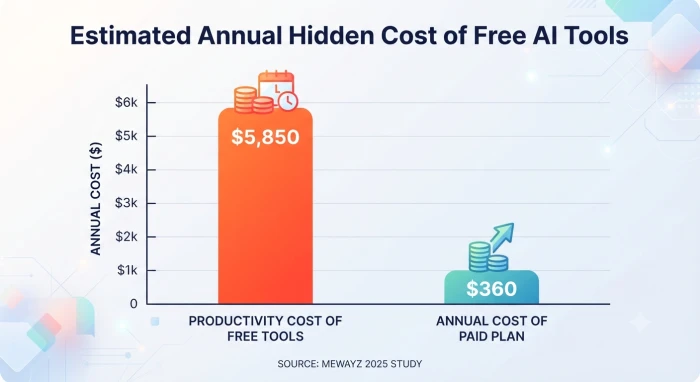
Free plans usually come with weaker protection than business or enterprise plans, and some free plans do use your data for training. If the tool will ever see customer information, do not run it on a free plan.
The monthly subscription price is only the starting point. Add up the per user fees, any usage credits, setup or integration costs, the time your team will spend learning it, and any premium features you know you will need within a year. A lot of tools moved to usage based or credit based pricing during 2026, so check what happens when you hit the limit. Some tools simply stop working. Others quietly charge you more.
AI still makes mistakes, and it makes them with great confidence. Make sure you can read and edit anything before it goes to a customer or gets published. For agents that take action on their own, look for an approval step and a clear log of what the AI did and when.
How long has the company been trading? How quickly do they answer support requests? Do they ship regular updates, and do they publish a roadmap? And what happens to your data if they close down? Read reviews from businesses of a similar size to yours, and ask the vendor for two or three real case studies rather than a slide of logos.
Do not try to compare twenty tools. Take the two or three that scored highest on the checklist and put them side by side. Almost every tool offers a free plan or a trial, so use it on real work rather than reading about it.
Here is a real example of how the comparison looks when it is filled in. The business is a ten person marketing agency that already pays for Google Workspace. Its problem, from Step 1, is that writers spend too long drafting client emails and proposals. The three tools on the shortlist were ChatGPT Business, Microsoft 365 Copilot Business, and the Gemini features that come with Google Workspace. Prices are list prices in US dollars as of September 2026, before tax, and will change over time.
| What we compared | ChatGPT Business | Microsoft 365 Copilot Business | Gemini in Google Workspace |
|---|---|---|---|
| Does it solve our exact problem? | Yes. Strong at drafting emails and proposals from a blank page. | Yes, but only inside Outlook, Word and Teams, which our team does not use. | Yes. Drafts directly inside Gmail and Docs, where the team already works. |
| Ease of use (score out of 5) | 5 | 3 for us, since it would mean switching apps | 4 |
| Connects to our apps? | Google Drive, Slack and other tools through built in connectors. | Built for Microsoft 365. We would need to move our files and email first. | Already inside Gmail, Docs, Sheets and Meet. Nothing to set up. |
| Is our data used for AI training? | No. Business plan data is excluded from training by default. | No. Covered by the standard Microsoft 365 business terms. | No. Covered by the standard Google Workspace terms. |
| Monthly cost for 10 people (list prices, September 2026) | About $250 on monthly billing, or about $200 on an annual plan. | About $180 for Copilot at the current promotional rate, plus a Microsoft 365 plan on top. Roughly $300 or more in total. | No extra cost. It is already included in our Workspace Business Standard plan (about $14 per user). |
| Can a person review before anything is sent? | Yes. Nothing is sent without us copying it over. | Yes. Drafts appear in the app and we hit send. | Yes. Drafts appear in Gmail and Docs and we hit send. |
| Support and vendor reliability (out of 5) | 4 | 5 | 4 |
| Can we test it cheaply? | Yes. Free plan for a first look, then two or three seats on monthly billing. | Buy two or three seats for one month rather than the whole team. | Yes. It is already switched on. Nothing to buy. |
What the table shows is that there is rarely one perfect answer. Gemini wins on cost and on fitting the tools the agency already uses. ChatGPT wins on writing quality and on flexibility. Copilot only makes sense if the agency moves to Microsoft, which it has no plans to do.
In the end the agency turned Gemini on for everyone, since it cost nothing extra, and bought two ChatGPT Business seats for the senior writers who handle the long proposals. That is a common outcome. Pick the tool that is good enough on every row. The one that is brilliant on a single row and weak on the rest will let you down.
Never roll a new AI tool out to the whole company on day one. A pilot of two to four weeks, with one team and one task, tells you almost everything you need to know.

• Week 0: measure how long the task takes today, and agree with the team on what success looks like. Write it down.
• Weeks 1 and 2: give the tool to three to five people and let them use it on real work. Someone checks every output before it goes anywhere.
• Week 3: count the results. Hours saved, mistakes made, what it actually cost, and whether people enjoyed using it. That last one matters more than it sounds.
• Week 4: make a decision. Scale it up, fix what did not work and try again, or drop it and move on.
Here is the sum we suggest for the Week 3 numbers. Take the hours saved each week and multiply by the hourly cost of the people involved. In the agency example above, four writers each saved about ninety minutes a day, which comes to roughly thirty hours a week. At an average cost of $35 an hour, that is about $1,050 a week in time, or around $4,500 a month. Against a tool cost of $50 a month for two ChatGPT seats, the decision was easy.
If the pilot works, expand a team at a time rather than all at once. The people who ran the pilot are your best trainers, because they already know what works and what does not. Four things make the rollout go smoothly:
• Share the prompts, templates and real examples that worked during the pilot. People copy examples far more readily than they read instructions.
• Write a short AI policy in plain language. One page is enough. It should say which information can be pasted into the tool (for example, nothing that identifies a customer without permission), which outputs must be checked by a person before they leave the building, and who to ask when something looks wrong.
• Give the tool an owner. One named person is responsible for usage, cost, questions and renewals. Tools without an owner drift.
• Put a review in the calendar for ninety days after launch. Look at the same numbers you measured in the pilot and decide whether to expand, adjust or stop.
A few things are different this year compared with even twelve months ago, and they affect how you should choose.
AI agents have gone mainstream. Most of the big platforms now let you set up an agent that works through a task on its own. This is great for routine work, but set limits on what an agent can do without a person approving it, especially anything that spends money or contacts a customer.
Businesses are buying fewer tools. The trend has moved away from five overlapping subscriptions towards a small set that works together. For most small and mid sized companies that means one general assistant, one automation tool, and one specialist tool for their biggest problem. If you already have several AI subscriptions, it is worth checking how many of them do the same job.
New transparency rules are now in force. Since 2 August 2026, the EU AI Act requires businesses to tell people when they are dealing with an AI system, such as a chatbot on your website, and to label content that AI generated. From 2 December 2026, AI generated images, audio and video must also carry a machine readable marker. The tougher rules for so called high risk uses, such as AI in hiring or credit decisions, have been pushed back to December 2027, but they are still coming. Even if you are not in Europe, similar rules are on the way in other countries, so choose tools that make disclosure and labelling easy.
Pricing has shifted. Many tools now charge by usage or by credits rather than a flat fee per user. That can be cheaper for light use and much more expensive for heavy use, so look closely at the limits before you sign a yearly contract.
• Buying a tool because a competitor uses it, or because it was trending on social media that week.
• Choosing the biggest platform with the most features instead of the one that fits the problem.
• Skipping the pilot and rolling out to everyone at once, then wondering why nobody uses it.
• Running customer data through a free plan without reading the privacy terms.
• Buying three overlapping tools before the first one is working properly.
• Leaving the tool with no owner, so nobody notices when it stops being useful or when the renewal bill arrives.
Choosing an AI tool well has less to do with finding the smartest technology and more to do with being disciplined about how you decide. Start with one real problem. Work out which type of tool solves it. Score your options against the seven must haves, compare a short list on real work, and run a small pilot with proper numbers. Then roll it out with a named owner and a one page set of rules.
Related guides and breakdowns from the same category.





Join the conversation
No comments yet
Start the conversation on How to choose the right AI tool for your business..