Every business uses many apps. Email, spreadsheets, a CRM, chat tools and more. Moving data between these apps by hand wastes hours every week. Automation tools fix this. When something happens in one app, the tool does the next step in another app for you. No copying, no pasting, no forgetting.
In 2026, these tools also use AI. Old automation only followed fixed rules and broke when the input looked different. AI automation can think a little. It can read an email and tell if it is a lead or a complaint. It can summarize a document. It can even build the whole workflow for you when you type what you want in plain English.
This guide covers the 7 best AI automation tools people are using right now. The three big names everyone compares, plus four of the hottest new AI-native tools. You will see real prices, honest downsides, and which one fits you.
| Tool | Best For | Main Features | App Connections | Starting Price | Free Plan |
|---|---|---|---|---|---|
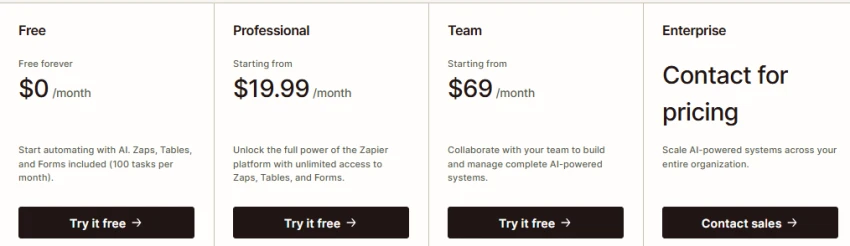
| Zapier | Beginners, most app choices | AI builder, AI agents, tables and forms | 9,000+ apps | $19.99/mo yearly or $29.99/mo monthly (750 tasks) | Yes, 100 tasks/mo |
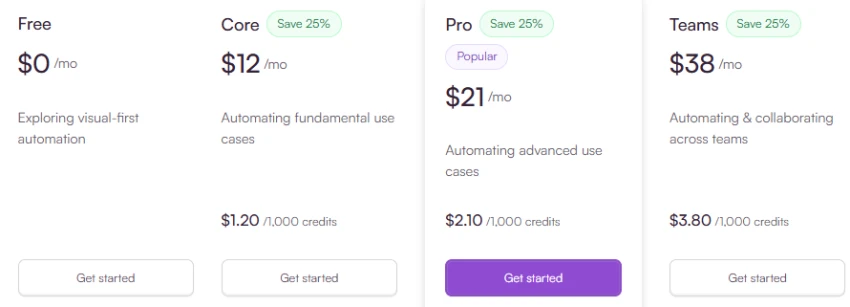
| Make | Big, complex workflows | Visual drag-and-drop builder, AI agents | 3,000+ apps | $10.59/mo yearly (10,000 credits) | Yes, 1,000 credits/mo |
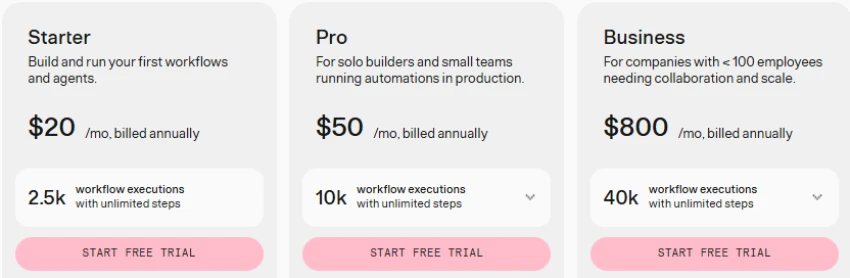
| n8n | Developers, own server | AI agent builder, code steps | 1,000+ apps plus any API | €20/mo yearly (2,500 runs). Free if self-hosted | Yes, free self-hosted version |
| Gumloop | AI-heavy work like scraping and content | AI workflow builder, unlimited team seats | Popular business apps plus 35+ AI models | $37/mo (20,000 credits) | No, 14-day trial only |
| Activepieces | Low budgets, open source | Simple builder, AI agents, chat to automation | 770+ apps | $20/mo monthly, from $16/mo yearly (10,000 credits) | Yes, 1,000 credits/mo |
| Lindy | AI assistants that work on their own | Email, phone and CRM agents | Popular business apps | $29.99/user/mo (3,000 credits) | 7-day free trial only |
| Latenode | Complex workflows at a low cost | No-code blocks plus code plus AI, pay for run time | 300+ apps plus any API | $19/mo (5,000 runs) | Yes, 300 runs/mo |
Zapier is the most popular automation tool in the world. It connects more than 9,000 apps, more than any other tool. So even small or unusual apps usually work with it.
What it can do. You build “Zaps”. A Zap means when X happens, do Y. Every plan, even the free one, includes Tables (to store data), Forms (to collect data) and Copilot, an AI helper that builds Zaps for you when you type what you want. Zapier also has AI Agents as an extra product. Agents are free for up to 400 actions a month, and the paid Agents plan costs $33.33 a month billed yearly.
How easy is it? Very easy. Pick a trigger app, pick an action app, connect your accounts and turn it on. Most people finish their first Zap in a few minutes. If a Zap fails, Zapier shows every step, so finding the problem is simple.
Pricing
Example uses. Save Gmail attachments to Google Drive. Send new website leads to your CRM. Create a task from an important email. Post in Slack when a new row is added to a Google Sheet.
Pros
Cons
Best fit. Beginners and small businesses that want to connect many apps fast with no technical skill.
Make (the old name was Integromat) is for people who find Zapier too simple. You build workflows on a visual board. Boxes connect with lines, like a flowchart. This makes big workflows with many branches easy to see and fix. Make connects more than 3,000 apps.
What it can do. Make added AI Agents in February 2026 on all plans. It also has Maia, an AI assistant, and built-in connections to OpenAI, Claude and Gemini. All apps are included on every paid plan with no “premium app” extra fees.
How easy is it? Harder than Zapier at first. The first hour can be confusing. But once you learn it, you can watch your data move through every step while the workflow runs, which makes fixing errors easy. For long workflows, Make is actually easier than Zapier.
Pricing
Example uses. Send a daily Slack summary from a Google Sheet. Sort shop orders by country and send them to your invoice app. Add an AI summary to every new lead before it reaches sales.
Pros
Cons
Best fit. Small businesses and power users who want strong workflows at a low price and do not mind learning.
n8n is the hottest tool among technical teams in 2026. You can run it on your own server for free, or pay for the cloud version. It is very strong for building AI agents. All plans include AI agent steps, human approval for AI actions, and code steps in JavaScript or Python. If an app is missing, you can connect it yourself through its API.
How easy is it? Not easy for beginners. You will see raw data at every step. Developers love this, but non-technical people often find it too much. If you self-host, you also have to install, update and secure it yourself. For testing and fixing workflows, n8n is the best here. You can re-run one step at a time.
Pricing
Example uses. An AI agent that reads support emails, checks the customer in your database, writes a reply and sends hard cases to Slack. Nightly jobs that move thousands of records, which would be very costly on Zapier.
Pros
Cons
Best fit. Developers and companies that want automation on their own servers for cost, privacy or legal reasons.
Gumloop is one of the fastest-growing new tools of 2025 and 2026. It was built for AI work from day one. You drag AI blocks onto a board to do things older tools struggle with, like scraping websites, reading PDFs, writing content, scoring leads and running AI agents. It gives you access to 35+ AI models, and you can connect your own AI accounts too.
How easy is it? Easy for an AI tool. The drag-and-drop board feels friendly, and there are many ready templates for marketing, sales and research work. But because almost every block uses AI, you need to watch your credit usage. Simple blocks use few credits, while heavy AI blocks use many.
Pricing

Example uses. Scrape competitor websites and get an AI summary every week. Read every new PDF invoice and put the data in a sheet. Score and enrich new leads with AI before they reach your CRM. Turn one blog post into social posts automatically.
Pros
Cons
Best fit. Marketing, sales and ops teams that want AI-heavy automation, like scraping, enrichment and content work.
Activepieces is the best value tool of 2026. It is open source, so you can run it on your own server for free with no limits. The cloud version is cheap too. It connects 770+ apps, and anything with an API works through its HTTP step. About 60 percent of its app connections are built by its community, so the list grows fast.
What it can do. Even the free plan includes workflows, AI agents, chat-to-automation (type what you want and it builds it), and tables. AI is not locked behind a paywall.
How easy is it? Easy. The builder looks and feels like Zapier, a simple top-to-bottom flow with branches. New users learn it in minutes. The trade-off is that some app connections have fewer options than the same connection on Zapier.
Pricing

Example uses. Send every form entry to your CRM. Auto-summarize every new support ticket with AI. Sync your own database with your CRM. Run marketing triggers thousands of times a month.
Pros
Cons
Best fit. Startups and small businesses on a budget, and anyone who runs workflows very often.
Lindy works differently from all the tools above. You do not build a workflow. You describe a job in plain English, and Lindy creates an AI agent that does it. For example, an agent that sorts your email, books your meetings, qualifies leads, or even answers phone calls.
How easy is it? Setup feels like chatting. You write what you want, connect your accounts and give feedback until the agent behaves right. For messy jobs full of reading and writing, this is faster than any workflow builder. The downside is control. An AI agent does not act exactly the same every time, so jobs that must run perfectly every time are safer in a normal workflow tool.
Pricing

Example uses. An agent that reads all your email, drafts replies in your style and books meetings. A phone agent that answers missed calls and saves notes to your CRM. A support agent that sorts tickets by urgency.
Pros
Cons
Best fit. Founders, sales teams and busy people who want an AI assistant for their inbox, calendar and CRM.
Latenode is a rising low-code tool with a clever idea. You pay for how long a workflow runs, not how many steps it has. One credit equals 30 seconds of run time, and most workflows finish within that, so complex multi-step automations stay cheap here while they get expensive everywhere else. You build with no-code blocks, and you can also drop in JavaScript code or AI steps when needed.
How easy is it? Between Zapier and n8n. The visual builder is friendly for simple flows, and an AI copilot can help write code blocks for you. But to get full value, some basic technical comfort helps. It suits people who outgrew Zapier but are not ready for n8n.
Pricing

Example uses. A 20-step lead pipeline that would be costly on Zapier. Website monitoring with AI summaries. Data cleanups mixing no-code blocks with small code snippets.
Pros
Cons
Best fit. Budget-aware builders and small teams running long, complex workflows who want code as an option, not a requirement.
Total beginner? Zapier. It is the easiest and connects the most apps. Relay.app is a cheaper second choice if it supports your apps.
Small business watching costs? Make or Latenode. Make gives the most power per dollar with the biggest app list. Latenode is even cheaper for long, complex workflows.
Developer or technical team? n8n. Full code access, self-hosting and pay-per-run pricing.
AI-heavy work like scraping, documents and content? Gumloop. It was built exactly for this, and unlimited seats make it great for teams.
Need a human to approve AI work? Relay.app. Approval steps are built in on every plan.
Want an AI assistant, not workflows? Lindy. Describe the job in plain English and it handles your email, calendar and calls.
Need everything on your own server? n8n. Free, unlimited and fully under your control.
There is no single winner, because each tool is made for a different person.
Zapier is still the safest start for beginners and the only choice when app coverage matters most, but it costs the most at scale. Make gives the best power for the price if you can handle the learning curve. n8n is the clear pick for technical teams and self-hosting.
The new wave earns its place on specifics. Gumloop wins for AI-heavy work like scraping and content, with unlimited seats for teams. Relay.app wins when humans must approve AI work before it ships. Lindy wins when you want an AI assistant instead of a workflow diagram. Latenode wins on price for long, complex workflows.
Start from your real needs. Your apps, your monthly volume, your team’s skills and your budget. Then test. Zapier, Make, n8n, Relay.app and Latenode all have free plans, and Gumloop and Lindy have free trials.
Related guides and breakdowns from the same category.






Join the conversation
No comments yet
Start the conversation on 7 Best AI Automation Tools in 2026 to Connect Apps....