Building a good deck is rarely about the ideas. It is the hours spent turning notes into slide copy, hunting for images that fit, lining up text boxes, and fixing fonts that drift between slides. Most presentations get rushed at exactly the stage where they should look most finished.
AI presentation makers compress that work. You give them a prompt, a document, or an outline, and they return a structured first draft with layouts, visuals, and consistent styling already applied. The better ones also keep every slide editable, so the draft is a starting point rather than a locked result.
This comparison looks at eight tools through the lens that matters when you are choosing: how fast each one produces a complete deck, how good the automatic layouts are, how much editing control you keep, how templates and branding work, whether you can export to PowerPoint and PDF, and what the free plan or trial lets you do before paying.
| Tool | Best For | Free Plan/Trial | Starting Price (USD) | Standout Feature |
|---|---|---|---|---|
| Gamma | Fastest prompt-to-deck drafts | Free plan (400 one-time AI credits) | $8/mo billed annually; $10 billed monthly | Card-based layouts that reflow automatically |
| Beautiful.ai | Decks that stay on-brand without design skill | 14-day free trial only (card required) | $14.50/mo billed annually; $45 single month | Smart Slides that re-layout as you add content |
| Canva | Visual, template-rich presentations | Free plan; 30-day Pro trial | $120/yr billed annually; $15 billed monthly | Magic Design plus the largest template library |
| Plus AI | AI inside Google Slides and PowerPoint | 7-day free trial | $10/user/mo billed annually; $15 billed monthly | Native add-on, no export step |
| Pitch | Team collaboration and deck analytics | Free plan (up to 5 members) | $22/mo billed yearly for 2 editors; $25 billed monthly | Slide-level engagement analytics |
| Prezi | Non-linear, visual storytelling | Free Basic plan (public, watermarked, no AI) | $7/mo billed yearly ($84/yr) | Zooming canvas and Prezi Video |
| PowerPoint with Copilot | People who live in PowerPoint | 1-month trial on Microsoft 365 Personal/Premium | $9.99/mo or $99.99/yr (Microsoft 365 Personal) | AI drafting from Word files inside PowerPoint |
| Chronicle | High-stakes business decks with AI editing | Free plan (no AI; up to 10 decks) | $12/user/mo billed annually; $15 billed monthly | Muse agent that edits existing slides |
Prices are per seat unless stated. Gamma, Pitch and Prezi display local currency on their pricing pages, so the USD equivalent can vary slightly by region.
Gamma is the tool most people mean when they say “AI presentation maker.” You start with a prompt, pasted text, an outline, or an uploaded file, and it builds a deck made of flexible “cards” rather than fixed-size slides. Each card holds a block of content, and the layout inside it reflows as you add or remove text, so the draft looks finished without any alignment work on your side. Gamma also uses the same engine to produce documents and simple web pages, which makes it a convenient single tool for people who need a deck today and a one-page site tomorrow. The editor is simple on purpose: you can restyle, swap images, and ask the AI to rewrite sections, but you are not dragging text boxes around pixel by pixel.
Gamma is fastest when you already have the content and need structure and design in minutes. Paste a report or meeting notes and the card system handles pacing and layout without manual alignment.

In my view, Gamma is the right first stop for almost anyone who has never used an AI presentation tool. The free plan is a real free plan, not a demo: you can build a deck and export it to PowerPoint or PDF without paying, which most competitors do not allow. I would recommend it to students, freelancers, and anyone who has a document and needs a presentable version of it within the hour. Where I would hesitate is for people who care about pixel-level control or who must deliver an editable PowerPoint file to someone else; the card layout does not translate cleanly into slides, and you will spend time tidying the export. The one-time free credits also mean you should treat the free plan as a trial that happens not to expire, rather than something you can rely on month after month.
Beautiful.ai is built around a single idea: the software should stop you from making bad slides. Its Smart Slides system gives you more than 300 layouts that rearrange themselves as you add bullets, images, charts, or data. Add a fourth item to a three-item layout and the slide redistributes everything to keep spacing and hierarchy intact. On top of that, the AI generator can draft a full deck from a prompt and pull context from files or links you provide. There is a custom theme builder for brand fonts and colours, PowerPoint import and export, viewer analytics, and a Team tier that adds a shared slide library, locked slides, and permissions so nobody on the team can stray from the approved look.
It is the strongest option when the problem is consistency across people. Junior staff cannot break the layout, so decks from a whole team look reviewed by a designer.
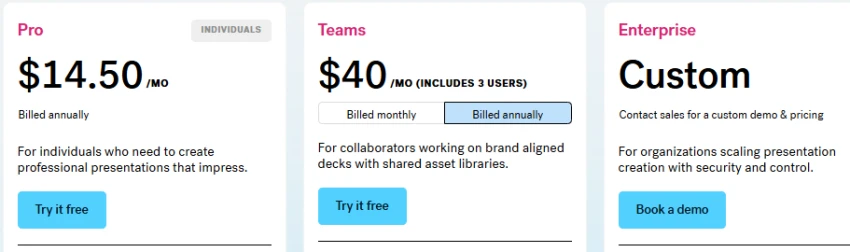
I think Beautiful.ai makes the most sense for professionals who present often and are tired of decks that look slightly different every time. If you are a consultant, an account manager, or anyone whose slides go in front of clients weekly, the design guardrails pay for themselves quickly. I would also point small teams at it when the real problem is five people producing five different-looking decks from the same template. Where I would not send people is the casual or occasional user: there is no free plan, the trial needs a card and auto-bills a full year, and the Team tier gets expensive fast. And if you are the kind of person who likes to nudge every element exactly where you want it, the guardrails will feel like a cage rather than a safety net.
Canva is a general design platform that happens to have one of the better AI presentation generators inside it. Magic Design takes a short description and produces a complete slide deck with layouts, images, and text in place. From there you are in the same editor Canva uses for social posts, documents, and video, which means you have access to a library of millions of templates, stock photos, icons, and animations without leaving the tool. Magic Write handles slide copy and speaker notes, Magic Switch converts a deck into a document or a different format, and Brand Kit on paid plans keeps generated content using your fonts, colours, and logos. Collaboration and comments are available on every plan, including Free, and exports cover PPTX, PDF, MP4, GIF, and PNG.
Canva is the right choice when the deck needs rich visuals: photos, icons, charts, animations, and branded graphics. Its AI draft is a starting point, but the library around it means you rarely leave the tool to finish.
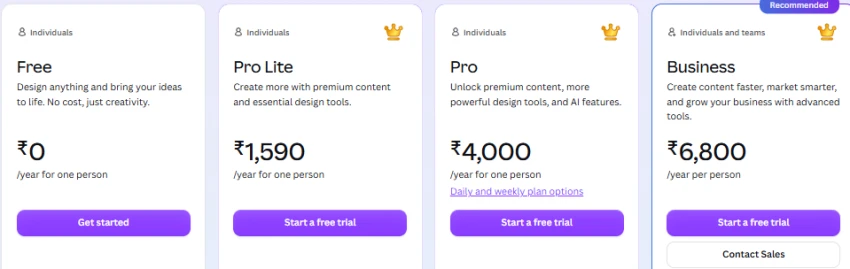
My honest take is that Canva is the best choice for people who already use Canva. If your social posts, flyers, and one-pagers live there, keeping presentations in the same place is worth more than any feature a dedicated tool offers, because your brand assets, photos, and team are already set up. I would recommend it to marketers, small business owners, teachers, and students who want a visually rich deck and do not mind spending time editing what the AI produces. Where I would look elsewhere is for text-heavy business decks: Canva’s AI draft is a starting point rather than a finished product, the layouts do not adapt to content the way Gamma’s or Beautiful.ai’s do, and every slide usually needs attention. It is a design tool with a presentation feature, not a presentation tool.
Plus AI takes a different approach from every other tool on this list: it does not have its own editor. It installs as an add-on inside Google Slides and as an add-in inside PowerPoint, and everything it generates lands directly in your existing file. You can describe a deck and get a full set of slides, upload a PDF, Word document, PPTX, or up to 100,000 characters of text to convert into slides, or insert a single AI-generated slide into a presentation you already have. Remix changes a slide’s layout, Rewrite adjusts the tone or length of its text, and because the output uses your template, the design matches whatever your team already uses. Enterprise plans add custom templates built to your brand guidelines and SOC 2 compliance.
No export step. You generate, edit, share and present in the tool you already use, so formatting survives and colleagues can co-edit normally.
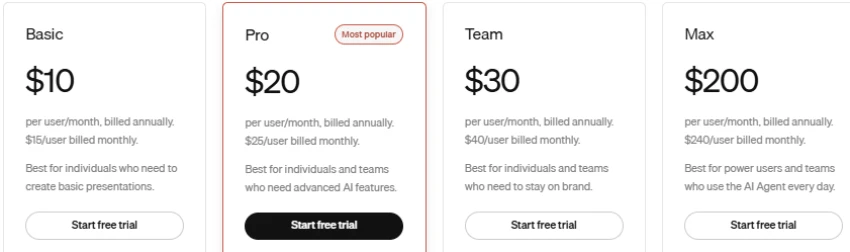
If you work in Google Slides all day, I would stop reading this article and try Plus AI first. The reason is simple: every other tool here produces something that eventually has to be exported, and exports are where formatting breaks and collaboration stops. Plus AI never leaves the file. I would also recommend it to teams with a strict company template, because it uses that template rather than imposing its own look. My reservations are two. First, the PowerPoint experience is still catching up to the Google Slides one, so Microsoft-first users may find it less smooth than they hope. Second, the design quality is only as good as the template you start from; if your template is plain, your AI slides will be plain too. There is also no free plan, only a week to decide.
Pitch is a presentation editor built for teams rather than individuals. Decks live in a shared workspace with admin, creator, and commenter roles, real-time multi-editor collaboration, shared and private folders, and version history. AI presentation creation is available on every plan including Free, so you can draft a deck from a prompt and then hand it to colleagues to refine. The feature that sets Pitch apart is its analytics links: when you share a deck, you can see visits, which slides were viewed, and how long each viewer spent on each slide, with optional email capture and passcode protection. Paid plans add video uploads, interactive embeds, custom fonts, and unbranded PDF and PowerPoint exports. Commenters join the workspace free, so stakeholders can give feedback without taking a paid seat.
Pitch fits teams that build decks together and need to know what happened after sending. Sales and fundraising teams get slide-level engagement data that PowerPoint and Google Slides do not offer.
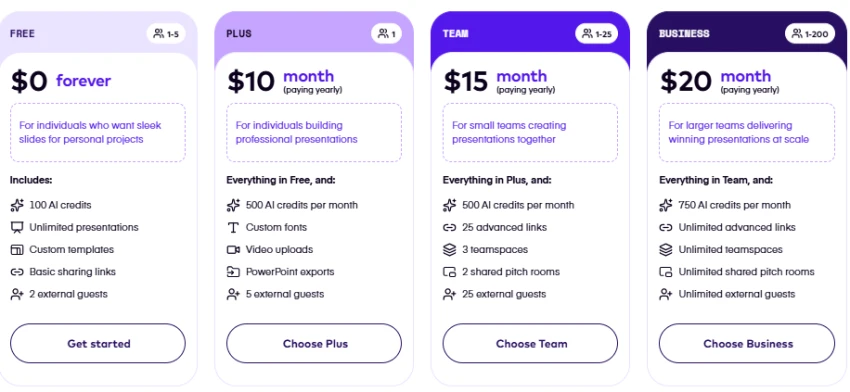
I would recommend Pitch to any founder or sales team that sends decks and then wonders what happened to them. Knowing that an investor spent two minutes on your traction slide and skipped the team slide is information you cannot get from a PDF attachment, and it changes how you follow up. The free plan is also unusually generous for small teams: five members, unlimited decks, and AI generation included. Where I would be careful is if you are a solo user, because paid plans are sold in bundles of editor seats and you will be paying for a second seat you may never fill. I would also not pick Pitch purely for its AI; the generator is competent but it is not the reason to buy. The reason to buy is the collaboration and the analytics, and if you do not need either, Gamma does the generation part cheaper.
Prezi replaces the slide-after-slide format with a single zooming canvas. Your content sits on one large surface and the presentation moves through it, zooming into details and pulling back to show how topics connect. Prezi AI now builds that canvas from a prompt or an uploaded document, drafts polls and quizzes, generates images, and rewrites text. Prezi Video is the other half of the product: it places your content next to you on camera so you can present in Zoom, Teams, or a recording without switching to screen share. Paid plans add PowerPoint import, a PowerPoint Converter that turns existing decks into Prezi format, offline mode, presenter view, voice-over, and on the top tier, analytics on who viewed your presentation.
When the content is a journey rather than a list, Prezi’s canvas helps audiences see how parts connect. It is also the only tool here with a strong built-in video presenting mode.
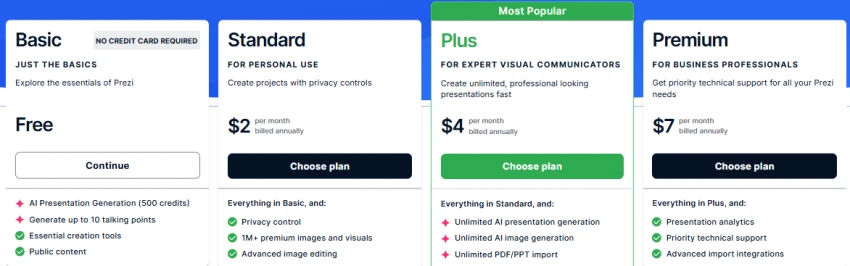
My view on Prezi is that it is a specialist tool and should be chosen as one. If you are a teacher, a conference speaker, or anyone whose job is to hold a room’s attention, the zooming format and the video presenting mode give you something no slide tool can match. The EDU pricing makes it an easy recommendation for students and educators. Where I would steer people away is anything that needs to end up as a normal file: the zoom effects do not survive export to PowerPoint, the free plan is public and watermarked with no AI at all, and everything is billed yearly, so there is no way to pay for one month and move on. I would also say that for a standard quarterly business review or a sales deck, Prezi’s format can distract more than it helps. Pick it for the storytelling, not for the speed.
Copilot in PowerPoint is Microsoft’s AI layer on top of the most widely used presentation software in the world. It can create a full deck from a prompt or, more usefully, from a Word document, applying your organisation’s template or Designer’s layout suggestions as it goes. Once the draft exists, Copilot can rewrite, condense, or expand slide text, generate speaker notes, summarise a long deck, or reorganise it into sections. Because you are in PowerPoint, you keep every editing, animation, and export capability the application has always had, and the business version of Copilot can reference your organisation’s files and data when drafting. The important change in 2026 is that Microsoft removed free Copilot Chat from the Office apps on 15 April, so in-app AI now requires a paid Microsoft 365 plan.
If your reports already live in Word and your company template lives in PowerPoint, Copilot removes the copy-and-paste stage. Everything stays inside Microsoft 365 with no conversion.
Copilot Pro was retired; consumer AI is now bundled into Microsoft 365 subscriptions.
I would recommend Copilot to one group above all others: people who already pay for Microsoft 365 and whose source material lives in Word. If your monthly report is a Word document and your deck template is a company PPTX, Copilot removes the most tedious step without introducing a new tool, a new login, or an export problem. For that workflow, I think it beats every standalone tool here on convenience. Where I would be more cautious is if you are buying Microsoft 365 specifically for the AI: the consumer plans cap usage with monthly credits, the design output leans on Designer suggestions rather than adaptive layouts, and the slides look like PowerPoint slides rather than something a designer touched. If you want polish rather than convenience, Beautiful.ai or Chronicle will serve you better.
Chronicle positions itself as a tool for the decks that matter: investor pitches, sales proposals, product reviews, and board updates. It generates a presentation from a prompt, notes, a document, or an existing deck you import, using a smart canvas that snaps elements into clean, professional layouts. The distinctive feature is Muse, an AI agent available on the Plus plan and above that makes targeted edits on instruction. Instead of regenerating the whole deck when one slide is off, you tell Muse to shorten the headline, swap the chart, or restructure the section, and it edits in place. Higher tiers add custom themes, custom fonts, advanced branding, and PowerPoint export, and Chronicle also offers an API and an MCP server so other AI tools can generate decks inside it.
Chronicle sits between a generator and an editor. Instead of regenerating the whole deck when one slide is wrong, you tell the agent what to change. That saves time on iterations, which is where most AI tools fall down.
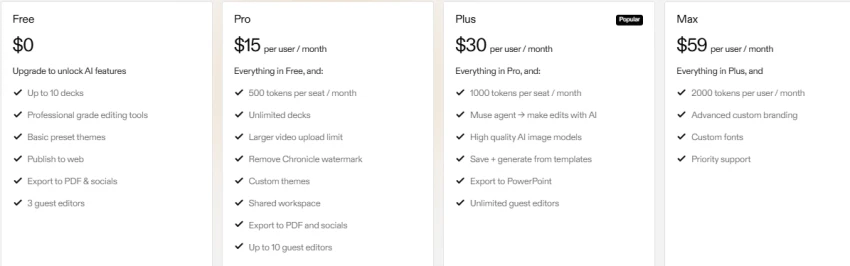
Chronicle is the tool I would point founders and business teams towards when they make a small number of decks that carry real consequences. The value is not in the first draft, which most tools can produce, but in the revision loop: being able to tell the AI what to change on a specific slide instead of regenerating and hoping is, in my opinion, the single most useful AI feature on this list. I would also recommend it to anyone who finds most AI presentations look generic; Chronicle’s defaults are more restrained and more business-appropriate. Where I would be careful is on cost and limits. The free plan has no AI at all, so you cannot try the main feature without paying. The Muse agent and PowerPoint export are locked to the Plus plan at $25 or more a month, and the token system expires unused allowance monthly. If you produce a lot of quick, low-stakes decks, Gamma will be cheaper and faster.
Fastest complete deck: Gamma. Paste text or upload a file and the card system produces a finished-looking draft without manual layout. Canva’s Magic Design is similarly fast but needs more editing afterwards.
Best automatic layouts: Beautiful.ai. Smart Slides re-arrange content as you add it, so the layout stays balanced without you touching alignment. Gamma’s cards are a close second.
Best for branded business presentations: Beautiful.ai for enforced consistency, Canva for Brand Kit flexibility, and Copilot if your brand template already lives in PowerPoint.
Best for editing existing PowerPoint presentations: Plus AI, because it works inside the file. Copilot is the alternative if you are on a paid Microsoft 365 plan.
Best for team collaboration: Pitch. Workspace roles, free commenters, version history and shared folders are built for review cycles, and the free plan supports 5 members.
Best for visual storytelling: Prezi for non-linear flow, Canva for media-rich slides.
Best for control over individual slides: PowerPoint with Copilot gives full manual control, and Chronicle’s Muse agent lets you direct edits slide by slide without losing the AI assist.
Students: Gamma’s free plan or Canva Free covers most class presentations at no cost. Prezi’s EDU plans at $4–8/month are worth a look for talks that benefit from a visual narrative.
Professionals creating reports and business decks: Copilot if you already pay for Microsoft 365; otherwise Beautiful.ai for consistent output or Chronicle for decks you will iterate on.
Startup founders preparing investor pitches: Pitch for collaborating with co-founders and tracking which slides investors spend time on; Chronicle if design quality and AI-assisted revisions matter more than analytics.
Marketing teams creating branded presentations: Canva Teams for Brand Kit, media and multi-format output; Beautiful.ai Team if deck consistency is the main problem.
Sales teams preparing client presentations: Pitch for engagement analytics on shared links, or Beautiful.ai for a locked template library that reps cannot break.
People who regularly work with PowerPoint or Google Slides: Plus AI. Nothing else here avoids the export step for both platforms.
After going through all eight of these tools, my overall feeling is that the category has split into two kinds of product, and the choice gets much easier once you know which kind you need.
The first kind is the standalone generator: Gamma, Beautiful.ai, Chronicle, Pitch, Prezi, and Canva. These give you a new editor and a new file format, and in return they do more of the design work for you. Among them, Gamma is the one I would tell most people to start with. The free plan is usable, the output looks finished faster than anything else, and the cost of being wrong is zero. Beautiful.ai is my pick for people who present professionally and want the design handled permanently rather than per deck, even though I dislike the trial that auto-bills a full year. Chronicle impressed me the most on the editing side; being able to direct changes slide by slide is the feature I think every other tool will copy eventually, and I would spend the money on it for a pitch or a board deck. Pitch I would choose only if collaboration and analytics are the reason, and Prezi only if the zooming format is the reason. Canva, for me, is less an AI presentation tool than a good design platform that can draft a deck.
The second kind is the add-on: Plus AI and Copilot. These do not replace your tools; they live inside them. My opinion is that if your work is already in Google Slides or PowerPoint, this category wins almost by default, because the biggest hidden cost of the standalone tools is the export at the end. Plus AI is the better of the two for Google Slides users and for anyone who wants their own template respected. Copilot is the better of the two if you already pay for Microsoft 365, especially for the Word-to-deck workflow, but I would not buy a Microsoft subscription just for it.
What I would push back on is the idea that there is a single best AI presentation maker. The tools that are fastest to a draft are not the ones that are easiest to edit, and the ones with the best design are not the ones that export cleanly. My advice is to decide two things before you pick: where your content starts, whether that is a prompt, a document, or an existing deck, and where the finished presentation has to end up, whether that is a web link, a PDF, or a PowerPoint file someone else will open. Answer those two questions and most of this list drops away on its own.
Related guides and breakdowns from the same category.





Join the conversation
No comments yet
Start the conversation on 8 Best AI Presentation Makers in 2026: Polished De....